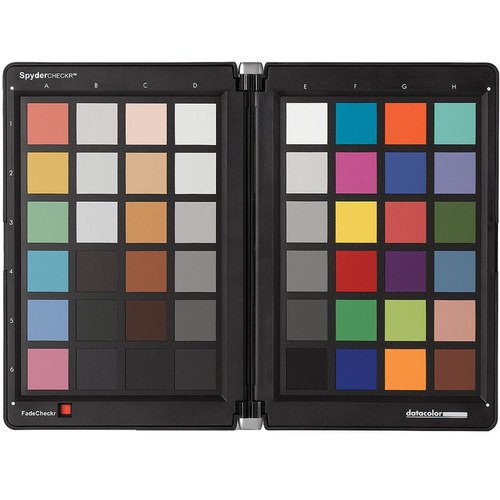
SpyderCHECKR Color Chart
₹350 / Day
- Neutral gray target and gray ramp for in-camera white balance and visual neutrality analysis
- Extensive skintone samples for portrait and fashion photography
- Dimensions : Open: 12.25 x 9.125″ / 31.115 x 23.178 cm
Closed: 6.75 x 9.125″ / 17.145 x 23.178 cm
The More Days Or More Equipment You Rent, The Price Will Go Down.
- Consistent Color Control for your RAW workflow made easy and fast with SpyderCHECKR and its powerful software, giving you a color standard for any camera and decreasing your post-production time
- Neutral gray target and gray ramp for in-camera white balance and visual neutrality analysis
- Extensive skintone samples for portrait and fashion photography
- Durable, eco-friendly self casing construction for easy transport and field use, with replaceable targets, tripod mount and Fade strip indicator
- Durable, eco-friendly self casing construction for easy transport and field use, with replaceable targets, tripod mount and Fade strip indicator
- The chart opens to 12.25 x 9.125″, and when folded closed measures 6.75 x 9.125″
- System Requirements : Operating System: Windows XP, Vista, 7; Mac OS X 10.4, 10.5, 10.6
Memory: 128 MB
Hard Drive: 100 MB
Software: Adobe Photoshop Lightroom, Photoshop, or Photoshop Elements; Adobe Camera RAW - Dimensions : Open: 12.25 x 9.125″ / 31.115 x 23.178 cm
Closed: 6.75 x 9.125″ / 17.145 x 23.178 cm
The SpyderCHECKR Color Chart and Calibration Tool for Digital Cameras from Datacolor is a color target for use with digital cameras. It features 48 swatches, including various shades of gray and skintones. The chart opens to 12.25 x 9.125", and when folded closed is 6.75 x 9.125". You can use the swatches to perform a custom white balance on your camera, ensuring that your camera settings correctly match the lighting conditions in which you are shooting.
The SpyderCHECKR ships with software for Mac and Windows. In order to use it, you'll have to use an Adobe Camera RAW (ACR) post-production workflow. This allows you to use the calibration tool in conjunction with Photoshop, Photoshop Elements, and Photoshop Lightroom.